

On this page7 sections
- What Snapshot 10 fixes—and what the announcement does not establish
- Graphics: separate fog controls and a changed Vulkan status
- Keyboard users should check the new repeat action
- Data-pack creators: dispenser behavior is now explicit data
- Commands, resource packs and server configuration
- Practical verification checklist
- Source and editorial method
Minecraft: Java Edition 26.4 Snapshot 10 fixes a crash when scrolling through the multiplayer menu. The supplied announcement is an updated Snapshot 9 article: its opening identifies the Snapshot 10 fix, while the longer feature and technical notes describe changes introduced in Snapshot 9. Keeping that distinction matters when deciding what to check after updating.
These are Java Edition testing builds, not a full 26.4 release or a Bedrock Edition Preview. The most directly affected groups are players using the multiplayer server list, players relying on keyboard navigation or narration, and creators maintaining dispenser logic, commands, resource packs or dedicated servers.
What Snapshot 10 fixes—and what the announcement does not establish
The Snapshot 10 update lists one fix: MC-313265, a crash triggered by scrolling through the multiplayer menu. If that was blocking access to your server list, scrolling through that screen is the first focused check to make.
The announcement does not describe the underlying cause or claim that every multiplayer crash is resolved. Its longer bug list belongs to Snapshot 9, so those fixes should not be presented as newly introduced by Snapshot 10.
Before trying either snapshot, back up your worlds or use a separate folder from your main worlds. The source explicitly warns that testing versions can corrupt worlds. Snapshots can be enabled in the Minecraft Launcher’s Installations tab; availability there does not make them stable releases.
Graphics: separate fog controls and a changed Vulkan status
Snapshot 9 makes Vulkan the default graphics backend instead of assigning it randomly, and the announcement says it is no longer considered experimental. That status change applies to the backend in these snapshot notes; it does not turn the snapshot itself into a finished release. The developer’s stated intention for the full release is conditional, not a guarantee.
The new Improved Fog setting separates a visual choice that was previously tied to Improved Transparency:
- With both enabled, sky and clouds blend into the terrain render-distance fog.
- With Improved Fog enabled and Improved Transparency disabled, only the sky receives that blending.
- Improved Transparency can now be used without Improved Fog.
Improved Fog is enabled by default, but the graphics preset matters: Fast disables it, while Fancy and Fabulous enable it. If your view looks different after changing presets, check both settings rather than assuming transparency alone controls the result.
The notes describe the fog setting’s performance impact as minimal while warning that it may be noticeable on lower-end hardware. They do not provide benchmarks or establish how Vulkan will behave on a particular system. Compare the combinations on your own setup rather than treating the default change as a performance promise.
Keyboard users should check the new repeat action
Snapshot 9 expands keyboard access to the Recipe Book and Creative Inventory. It also changes an established interaction: repeating the last selected recipe moves from Space and Enter to the new Repeat Recipe/Trade key, which defaults to R. The same binding repeats the last selected trade in Villager and Wandering Trader screens.
That does not mean Enter and Space stop working in the Recipe Book. On a focused recipe, they place it into the crafting grid; holding Shift places as many as possible. For navigation, Tab moves among the tab buttons, search box, filter, recipes and page buttons. Control + Enter opens the alternative-recipe popup, arrow keys move inside it, and Escape or Tab closes it.
For players who navigate by sound, narration now supplies more context. Recipe entries include the result and their row and column, while page buttons announce the current page. Creative Inventory tabs are read with their names and positions, and items with their grid positions.
The practical distinction is between activating a focused recipe and repeating the previous selection. If a familiar trading or crafting workflow seems unresponsive, check the new binding before treating it as a failure. Also verify that your preferred bindings and narrator workflow remain usable across the screens you rely on.
Data-pack creators: dispenser behavior is now explicit data
The technical notes set the Data Pack version to 128.0 and introduce the dispense_behavior registry folder. Each entry defines a list of behaviors to attempt when an item is dispensed. Generally, behaviors run in sequence until one succeeds, but the announcement explicitly allows exceptions.
Items select this logic through minecraft:dispense_behavior. Its value can be a namespaced registry entry ID or an inline list of dispense behaviors. This makes the order of attempts and their failure conditions important parts of a creator’s design, rather than details to infer only from the item’s usual behavior.
For example, minecraft:place_block requires a block item, and minecraft:equip requires an item that can be equipped into a slot on the target entity. A list of behaviors is therefore not a promise that every step will run. There are also stopping conditions that deserve special attention: when minecraft:charge_respawn_anchor encounters an already fully charged anchor, no further behaviors are tried.
Boat and Minecart items now have minecraft:entity_data by default to determine the entity placed when used or dispensed. The placement behaviors enforce type requirements; a mismatched entity type makes the action fail. Creators modifying those components should check both direct item use and dispenser placement, rather than assuming arbitrary entity data will be accepted.
For projectile behavior, minecraft:shoot_projectile exposes spawn positioning, inaccuracy, velocity and an optional sound object. The notes specify these fields, but do not supply a complete custom-pack example. Validate the actual behavior sequence and field values in your test pack instead of assuming an older customization will carry over unchanged.
Commands, resource packs and server configuration
Commands accepting the listed 2D coordinates now support local arguments in the form ^<left> ^<forwards>. The affected locations are chunk coordinates in forceload, spreadplayers <center> and worldborder center <pos>. These arguments use rotation around the Y axis only; they are not equivalent to taking a three-axis local coordinate with a zero vertical argument and projecting it onto the XZ plane. Command authors should check the resulting horizontal positions when looking up or down, not just when looking straight ahead.
The Resource Pack version is 104.0. Packs touching Recipe Book visuals should review the new recipe_book/slot_highlight_back.png and recipe_book/slot_highlight_front.png sprites. Packs modifying shaders should review core/terrain.fsh, which changed to support the separate Improved Fog setting. Language keys beginning with menu.custom_options or menu.custom_screen_info can no longer be replaced by resource packs.
Dedicated-server administrators also have a new property, key-rotation-period-seconds, alongside a modified login protocol and encryption key establishment procedure. The property controls the minimum duration before keys used to establish new connections are recreated. Its default is 60; setting it to 0 uses a unique ephemeral key for every connection. The announcement does not give a compatibility matrix for external server software or a recommendation to change this default.
Practical verification checklist
Use a backed-up world or a separate testing folder, and keep the checks tied to the changes that affect your setup:
- Multiplayer players: confirm you are running 26.4 Snapshot 10, then scroll through the multiplayer menu to check the interaction covered by MC-313265.
- Graphics users: inspect Improved Fog and Improved Transparency separately, including after switching between Fast, Fancy and Fabulous presets.
- Keyboard and narrator users: check Recipe Book focus movement, the alternative-recipe popup, Creative Inventory narration and the Repeat Recipe/Trade binding.
- Data-pack creators: review the 128.0 format target, dispenser behavior ordering, failure conditions and Boat or Minecart entity-type requirements.
- Command creators: verify the documented two-axis local coordinates against intended horizontal positions, especially with different viewing angles.
- Resource-pack creators: review the 104.0 format target, Recipe Book highlight sprites, terrain shader changes and restricted language-key prefixes.
- Server administrators: review the new key-rotation property and exercise your normal connection workflow before relying on the testing build.
These are suggested verification steps, not reports of testing. The announcement establishes a specific Snapshot 10 crash fix and a broad set of Snapshot 9 changes, but it does not establish universal pack compatibility, hardware performance or a guaranteed final-release configuration.
Source and editorial method
Minecraft.net: Minecraft 26.4 Snapshot 10 — 2026-11-17.
AI-assisted writing and source review; not independently tested in-game. Report factual corrections through the Contact page.
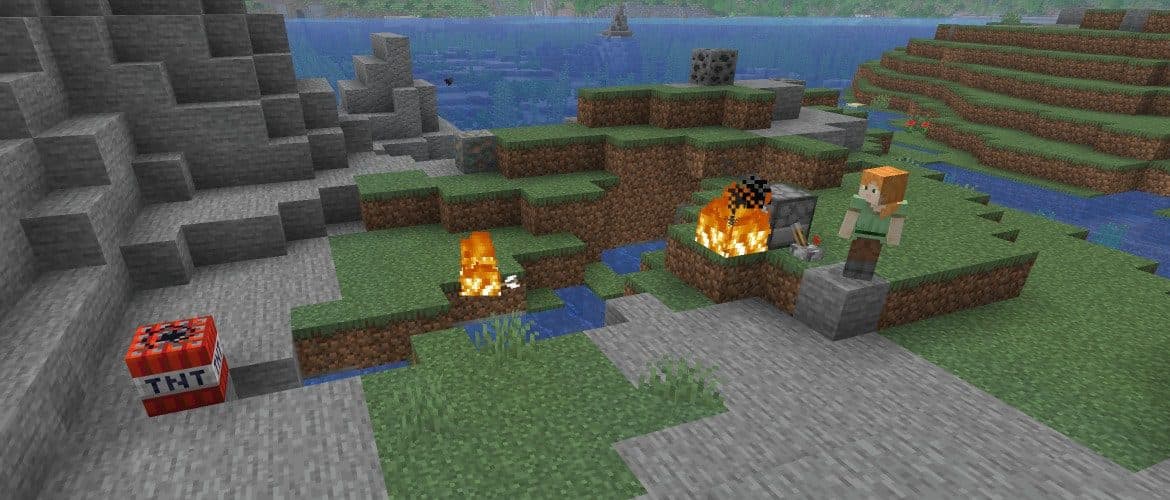
Cover image: Minecraft.net.
Comments
Loading comments…
Author: TDT · AI-assisted
Related articles






Bedrock · Add-on, Java · DatapackMC 1.18 – 26.3
Saitama One Punch Man Datapack & Add-on for Minecraft
59 views61 downloads4 comments