

On this page6 sections
Overview of Tectonic
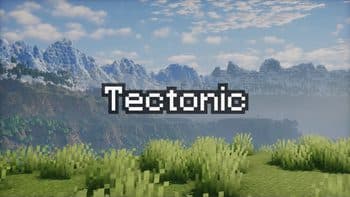
Tectonic is a Minecraft world generation project created by Apollo that alters terrain shaping across the Overworld. Distributed under the MIT license as both a datapack and a mod, the project works within the Java Edition ecosystem across loaders including datapack, Fabric, Forge, NeoForge, and Quilt. It does not target Minecraft Bedrock Edition.
The primary focus of Tectonic is structural terrain reshaping rather than introducing new blocks or entities. The project generates broad continental landmasses, vastly taller mountain elevations, subterranean river channels, and sunken oceanic floors.
Edition Support and Version Caveats
Although the project documentation lists compatibility across an extensive range of historical and upcoming version strings—including 1.18.2 through 1.21.11, as well as version numbers spanning 26.1 through 26.3—active developer maintenance is heavily restricted. The project author specifies that current issue fixes are supplied exclusively for versions 1.21.1 and 26.1. Older target versions will not receive bug fixes or patches. Players running other listed versions must proceed knowing that any unresolved generation bugs or technical quirks remain unaddressed.
Terrain and World Generation Features
Under Tectonic v3, world generation shifts toward distinct land structures and elevated verticality:
- Continents and Islands: Land forms into vast continental regions spanning thousands to tens of thousands of blocks across. The ocean areas separating these landmasses host smaller islands up to around one thousand blocks wide, utilizing vanilla mountain terrain shaping to form traditional mountain rings.
- Deeper Oceans: Ocean floors descend much lower than standard vanilla baselines, pushing deep oceans into the deepslate layer with overhangs and submarine valleys. When running the mod packaging of Tectonic, vanilla Ocean Monuments are relocated downward to account for these lower depths.
- Mountain Ranges and Underground Rivers: Mountain ranges extend for tens of thousands of blocks and reach upward near the world build limit. Where peaks are too steep for normal surface rivers, water channels carve directly underground to maintain unbroken exploration pathways. In the mod build, these underground passages feature increased glow lichen and rare lantern placements.
- Lava Tunnels and Caves: Far below the surface, deep variants of underground rivers generate as lava tunnels with specialized shaping.
- Biome-Specific Landforms: Deserts feature smooth rolling dunes, badlands generate expansive canyons alongside isolated plateaus, and jungle biomes generate towering vertical pillars reaching over one hundred blocks tall. In lowlands, forest, jungle, and taiga variants form wetlands with frequent ponds near sea level.
- Tiered Plateaus and Valleys: Elevated regions form multi-tiered plateaus equipped with natural ramps for survival navigation. In specific biomes like Cherry Groves and Pale Gardens, surrounding plateau terrain encloses the area to create sunken valleys.
Biome Mod Compatibility and Integrations
Compatibility with external world generation projects depends on the specific framework each mod employs:
- Terrablender and Biolith: Tectonic natively supports biome mods that route generation through Terrablender or Biolith. Documented examples include Biomes O' Plenty (BOP), Regions Unexplored (RU), Nature's Spirit (NS), and Biomes We've Gone (BWG).
- Terralith: Terralith compatibility requires a dedicated version. This configuration is packaged directly inside the mod build and is separately available as a standalone datapack. When running alongside Terralith, Tectonic's ocean islands spawn Calderas and Volcanoes.
- CliffTree: On Minecraft version 1.20, Tectonic and CliffTree are strictly incompatible. On version 1.21, interoperability requires specific tweaks, which are bundled into the mod version or downloadable as a separate datapack.
- In-Game Configuration: When using the mod release rather than the bare datapack, Tectonic v3 includes an in-game configuration screen to adjust terrain parameters directly.
Installation and Pre-Launch Checklist
Before adding Tectonic to an existing environment or generating a new world, review the following operational steps:
- Verify Minecraft Edition: Ensure you are running Minecraft Java Edition. Bedrock Edition cannot load Fabric, Forge, NeoForge, Quilt, or Java-format datapacks.
- Confirm Supported Versions: Check that your game profile runs version 1.21.1 or 26.1 if you require active bug fix support from the author.
- Select Package Type: Decide between the standalone datapack and the mod release. The mod edition includes extra conveniences, including an in-game configuration screen, lowered Ocean Monuments, and underground river lanterns.
- Check Ecosystem Dependencies: If combining Tectonic with Terralith or CliffTree, confirm that you have the appropriate compatibility datapack or are utilizing the bundled mod build.
- Create World Backups: Terrain generators fundamentally reshape chunk structures. Always back up existing world saves before adding, updating, or testing terrain datapacks and mods.
Source and editorial method
Modrinth: Tectonic — 2026-11-07.
Created by Apollo. Get the files from the project page above.
Image: Modrinth / Apollo.
AI-assisted writing and source review; not independently tested in-game. Report factual corrections through the Contact page.
Comments
Loading comments…
Author: TDT · AI-assisted
Related articles


NewsMC 1.16.3 – 26.3
Minecraft 1.16.3-26.3: Sodium Mod Rendering Guide

Java · Datapack, Bedrock · Add-onMC 1.18 – 26.4
Saitama: One Punch Man (OPM) – Java Datapack and Bedrock Add-on
73 views74 downloads4 comments

Bedrock · Add-on, Java · DatapackMC 1.21.11 – 26.4
Mahoraga Wheel of Adaptation: Minecraft Datapack & Add-on
70 views42 downloads