

On this page7 sections
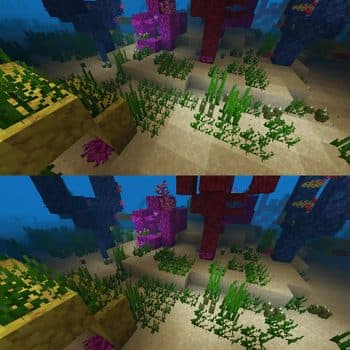
For Minecraft releases spanning version 1.16.3 through version 26.3, the Sodium modification by jellysquid3 provides an alternative rendering engine designed to replace the standard client rendering pipeline. Listed under the Polyform Shield 1.0.0 license (LicenseRef-Polyform-Shield-1.0.0), Sodium focuses specifically on visual rendering performance, targeting micro-stutter reduction, frame rate improvements, and graphical bug fixes while maintaining standard visual aesthetics.
Project Overview and Core Purpose
Sodium is structured as an optimization mod for the Minecraft client. Rather than altering game elements outside visuals, the mod isolates its modifications exclusively to the client rendering engine. According to the developer documentation, the primary goals are raising frame rates, minimizing frame pacing irregularities such as micro-stutter, and correcting various client-side graphical defects.
The developer highlights broad compatibility across the wider modding ecosystem without altering the visual presentation of the game. For players seeking broader optimizations, the project documentation clarifies that Sodium's scope is strictly confined to rendering code. System areas outside rendering are addressed by companion projects, notably Lithium for Minecraft versions 1.15 and higher, and Phosphor for Minecraft releases prior to 1.19.
Supported Mod Loaders and Minecraft Versions
Sodium lists compatibility with three distinct mod loaders across a broad catalog of Minecraft releases:
- Supported Loaders: Fabric, NeoForge, and Quilt. Fabric Loader is explicitly designated by the author as the recommended choice for a simple and lightweight deployment.
- Supported Minecraft Versions: The listed range begins at Minecraft 1.16.3 and extends through releases up to 26.3. The complete list of supported targets in the project metadata includes:
- 1.16.3, 1.16.4, 1.16.5
- 1.17, 1.17.1
- 1.18, 1.18.1, 1.18.2
- 1.19, 1.19.1, 1.19.2, 1.19.3, 1.19.4
- 1.20, 1.20.1, 1.20.2, 1.20.3, 1.20.4, 1.20.5, 1.20.6
- 1.21, 1.21.1, 1.21.2, 1.21.3, 1.21.4, 1.21.5, 1.21.6, 1.21.7, 1.21.8, 1.21.9, 1.21.10, 1.21.11
- 26.1, 26.1.1, 26.1.2, 26.2, 26.3
Players must match the specific mod build to their chosen loader and exact Minecraft version target.
Hardware Compatibility and Driver Requirements
Hardware support for Sodium is defined by graphics architecture and driver standards rather than general processing hardware alone:
- Official Support Standard: Official support requires desktop graphics cards with up-to-date drivers capable of OpenGL 4.5 or newer.
- GPU Architecture Baselines: Most graphics hardware released within roughly twelve years of the project documentation meets these specifications, including:
- Intel HD Graphics 500 Series (Skylake architecture) or newer
- NVIDIA GeForce 400 Series (Fermi architecture) or newer
- AMD Radeon HD 7000 Series (GCN 1 architecture) or newer
- Legacy Graphics Compatibility: Desktop graphics hardware capable of running the baseline Minecraft client (which mandates OpenGL 3.3) should generally function with Sodium. However, the development team cannot guarantee stability, provide active troubleshooting support, or promise forward compatibility for older hardware in future updates.
- Unsupported Configurations: Android systems and certain Windows-on-ARM hardware relying on OpenGL translation layers—such as GL4ES, ANGLE, or GLonD3D12—are explicitly unsupported. Systems forced to run through these translation layers encounter severe performance degradation.
Out-of-date GPU drivers are identified as the primary contributor to client crashes, graphical anomalies, and degraded frame rates.
Installation and Configuration Workflow
Setting up Sodium follows standard client-side modification procedures:
- Loader Preparation: Install a compatible mod loader (Fabric, NeoForge, or Quilt). Third-party launcher utilities often supply automated setup routines for these loaders.
- File Placement: Place the downloaded Sodium mod archive into the system's active
mods folder. - Installation Verification: Launch the client and navigate to the in-game Video Settings menu. Successful installation replaces the default interface with Sodium's updated user interface.
- Configuration Strategy: By default, Sodium automatically activates all optimization passes supported by the host hardware. Manual adjustment of performance or advanced rendering parameters is generally unnecessary unless resolving specific graphical issues.
Pre-Installation and Verification Checklist
Before deploying Sodium into a Minecraft setup, evaluate the following checklist grounded in the project requirements:
- [ ] Confirm your target Minecraft release is explicitly listed among supported versions (1.16.3 through 26.3).
- [ ] Ensure a supported mod loader is present (Fabric Loader recommended, NeoForge, or Quilt).
- [ ] Check that host graphics hardware meets the OpenGL 4.5 standard for official support.
- [ ] Verify that current graphics drivers are updated to their latest stable vendor release.
- [ ] Ensure the device does not rely on OpenGL translation layers (avoiding Android and unsupported Windows-on-ARM configurations).
- [ ] Review companion needs: confirm whether non-rendering optimizations from Lithium or Phosphor are relevant for your version.
- [ ] Inspect the in-game Video Settings screen upon startup to confirm interface replacement.
Project Limitations and Technical Unknowns
While the developer provides reference testing data based on an Intel Core i7-1165G7 system with Intel Xe Graphics under Fedora 41 (Linux kernel 6.12.4, Mesa 24.3.4, OpenJDK 21.0.7, Fabric Loader 0.16.10), performance gains vary across specific CPU and GPU configurations. The source material does not provide comparative telemetry across dedicated desktop cards.
If unexpected behavior or crashes occur, issues should be submitted to the project issue tracker. Bug reports must include the complete active mod listing along with relevant client log files and crash reports.
Source and editorial method
Modrinth: Sodium — 2026-11-12.
Created by jellysquid3. Get the files from the project page above.
Image: Modrinth / jellysquid3.
AI-assisted writing and source review; not independently tested in-game. Report factual corrections through the Contact page.
Comments
Loading comments…
Author: TDT · AI-assisted
Related articles

Bedrock · Add-on, Java · DatapackMC 1.18 – 26.3
Saitama One Punch Man Datapack & Add-on for Minecraft
59 views61 downloads4 comments

Bedrock · Add-on, Java · DatapackMC 1.18 – 26.4
Double Jump for Minecraft: Java Datapack and Bedrock Add-on
27 views27 downloads

Bedrock · Add-on, Java · DatapackMC 1.21.11 – 26.4
Mahoraga Wheel of Adaptation: Minecraft Datapack & Add-on
47 views25 downloads

Bedrock · Add-on, Java · DatapackMC 1.21.5 – 26.4
1.8 Sword Blocking Datapack & Add-on for Minecraft
21 views12 downloads